
It’s 6:50 on a Friday in Lincoln Park. A couple is standing on the sidewalk, phone out, deciding where to spend $120 on dinner. They tap your restaurant’s link, and a spinner appears. One second. Two. Three. Before your beautiful hero photo of the dry-aged ribeye even loads, they’ve already swiped back to Google and booked the spot two doors down. You never knew they existed — and the difference wasn’t your food. It was your website’s page speed.
In a city with as much competition as Chicago, the platform your site is built on is not a back-office detail — it’s the front window. This is the honest, numbers-first comparison of the two most common ways to build a restaurant website in 2026: Astro vs WordPress. We’ll look at real page-speed data, Core Web Vitals, local SEO, editability, and true cost — so you can see which one actually gets that couple in Lincoln Park to walk through your door.
Table of Contents
- The 30-second answer
- Why page speed decides whether a Chicago diner books you
- Astro vs WordPress: what’s actually different under the hood
- The side-by-side comparison
- Speed is money: what a faster site is worth
- Core Web Vitals and winning the Chicago map pack
- Where WordPress still makes sense
- What a done-for-you Astro restaurant site includes
- A practical migration path
- Frequently asked questions
The 30-Second Answer
For a restaurant website, Astro beats WordPress on the thing that matters most — speed. Astro is a modern framework that builds your pages into static HTML and ships almost no JavaScript to the diner’s phone, so pages open in a blink and reliably score 90+ on Google PageSpeed. WordPress renders pages through PHP, a database, a theme, and a stack of plugins, which is flexible but heavy — and that weight is exactly what makes a hungry, impatient mobile visitor bounce.
WordPress is not “bad.” It runs about 43% of the web for good reasons: a massive plugin ecosystem and familiar editing. But for a restaurant — where nearly all your traffic is a mobile guest deciding right now whether to book — the fastest site wins the table. If your current site feels slow on a phone, that’s covers walking out the door. Everything below is the evidence, and where each platform genuinely fits.
Why Page Speed Decides Whether a Chicago Diner Books You
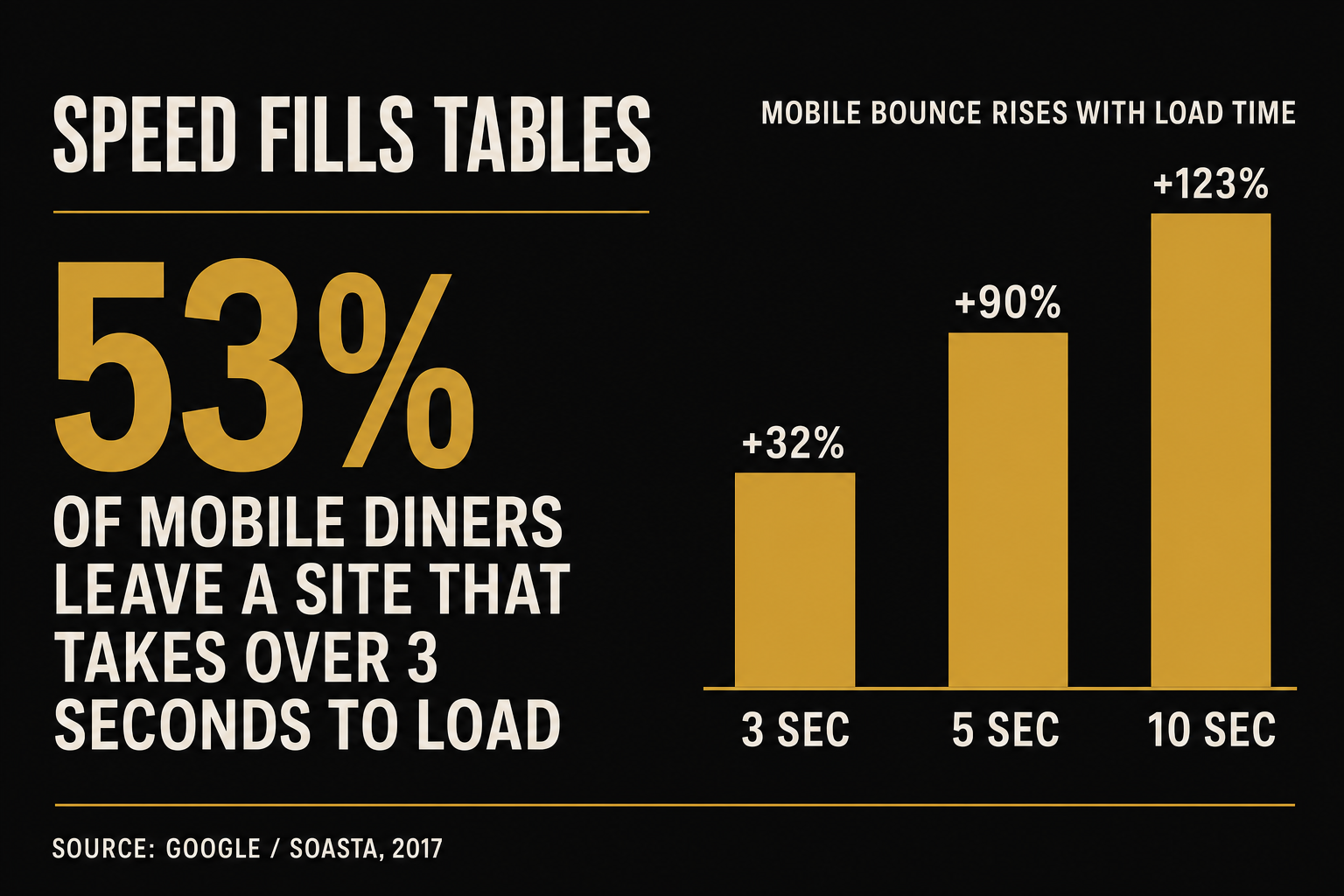
Restaurant traffic is overwhelmingly mobile and overwhelmingly impatient. A diner searching “dinner reservations near me” on the sidewalk isn’t reading — they’re scanning, and they’ll give your site about three seconds before they quit. Google’s own research put a hard number on it: 53% of mobile visitors abandon a site that takes longer than three seconds to load (Google / DoubleClick, 2016).
It gets steeper the slower you go. Using a deep-learning model trained on real bounce data, Google and SOASTA found that as a page’s load time stretches from one second to three, the probability of a bounce jumps 32%. By five seconds it’s up 90%, and by ten seconds, 123% (Google / SOASTA, 2017). Every extra second is a measurable slice of your dinner rush choosing someone else.
This is not abstract. Diners research before they walk in: 77% look at a restaurant’s website before dining out, and in one survey nearly 70% said a restaurant’s website had actually discouraged them from visiting (MGH, 2019). A slow, clunky site tells a first-time Chicago guest your restaurant is slow and clunky too — before they’ve tasted a thing.
Astro vs WordPress: What’s Actually Different Under the Hood
The gap comes down to how each platform builds a page.
WordPress renders on demand. When someone opens your page, a server runs PHP, queries a MySQL database, assembles your theme, and executes every active plugin — then sends the result, usually along with jQuery, multiple CSS files, a page-builder’s runtime, and tracking scripts. It’s endlessly flexible, and it’s why WordPress runs ~43% of the web (W3Techs, 2026). But every plugin you add is more code the diner’s phone has to download and run. That’s how the median mobile web page ballooned to about 2.36 MB — nearly triple its 2015 weight — shipping roughly 664 KB of JavaScript alone (HTTP Archive, 2025).
Astro builds ahead of time. Astro compiles your site into plain static HTML during the build, strips out any JavaScript a page doesn’t truly need (“islands architecture”), and serves those files straight from a global edge network like Cloudflare. There’s no database call, no plugin stack, no page-builder overhead at the moment a guest taps your link — just a finished page arriving almost instantly. Less to download, nothing to execute, nothing to break.
The Side-by-Side Comparison
Here’s how the two stack up on the factors that decide whether a restaurant website fills tables. This is the honest scorecard — including the places WordPress genuinely competes.
Astro vs WordPress for a restaurant website
| Plan | Astro (static-first) recommended | WordPress (typical build) |
|---|---|---|
| Price | Fills tables | Often slow |
| Feature 1 | Static HTML, near-zero JavaScript — routinely 90–100 PageSpeed | PHP + database + theme + plugins — frequently fails PageSpeed on mobile |
| Feature 2 | Passes Core Web Vitals out of the box (fast LCP, tiny payload) | Core Web Vitals depend on constant optimization and caching plugins |
| Feature 3 | Served from the edge (Cloudflare) — no server to slow down or hack | Needs managed hosting; server load and downtime are your problem |
| Feature 4 | Clean schema, meta, sitemap and llms.txt built in for SEO/AEO | SEO needs plugins (Yoast/Rank Math); llms.txt is manual |
| Feature 5 | Per-neighborhood location pages that load instantly | Location pages possible but add weight and plugins |
| Feature 6 | No plugin attack surface; near-nothing to keep patched | Plugins/themes are the #1 security and breakage risk |
| Feature 7 | Menu edits handled for you (or via a simple CMS) | Easy self-editing — the genuine WordPress strength |
| Feature 8 | Free domain + managed hosting; no surprise fees | Hosting + SSL + plugin renewals + update fees add up |
| Get an Astro site → | The status quo |
The pattern is clear: WordPress wins on do-it-yourself flexibility, and Astro wins on everything a diner actually experiences — speed, reliability, and search visibility. For a restaurant, the diner’s experience is the whole game.
Speed Is Money: What a Faster Site Is Worth
Faster pages don’t just reduce bounces — they measurably increase the number of people who complete an action, whether that’s a reservation, an order, or a call. Portent’s analysis of site speed found that a site loading in one second converts roughly three times better than one loading in five seconds (Portent, 2022). And Deloitte’s landmark Milliseconds Make Millions study, run with Google across dozens of brands, found that improving mobile load time by just 0.1 seconds lifted retail conversions 8.4% and average order value 9.2% (Deloitte, 2020).
Apply that to a restaurant. If a hundred people a night reach your reservations page and even a handful more complete a booking because the page opened instantly, that’s several tables you would otherwise have lost — every single night, compounding. Speed isn’t a vanity metric; it’s the cheapest table-filler you’ll ever install. It’s also why our prebuilt restaurant website and the online reservation flow are built speed-first, not bolted onto a heavy theme.
Core Web Vitals and Winning the Chicago Map Pack
Speed also decides whether Chicago diners find you at all. Since the 2021 Page Experience update, Core Web Vitals are an official Google ranking signal (Google Search Central). Google grades every page against three “good” thresholds, measured on real users’ phones: Largest Contentful Paint (LCP) under 2.5 seconds, Interaction to Next Paint (INP) under 200 milliseconds, and Cumulative Layout Shift (CLS) under 0.1 (web.dev, 2024).
This matters most where restaurants get discovered: Google’s local map pack, the three businesses shown on a little map for “brunch near me” or “best deep dish River North.” Winning it is mostly about your Google Business Profile and fresh reviews (we cover that in the restaurant local SEO playbook), but a fast, well-structured website is the connective tissue — it’s what AI answer engines and Google crawl to understand your menu, hours, and neighborhoods. In a market as dense as Chicago’s — the National Restaurant Association has estimated Illinois foodservice at roughly $30 billion in annual sales, and Chicago Restaurant Week 2025 drew 470+ participating restaurants (Choose Chicago, 2025) — those structural advantages are how you climb above the delivery apps and the restaurant down the block.
Where WordPress Still Makes Sense
An honest comparison names the exceptions. WordPress is the right call when you have an in-house person who will genuinely log in and edit the site weekly, when you need a specific plugin (a particular events calendar, a membership system, a complex multilingual setup) that has no clean static equivalent, or when you’re running a content-heavy operation — a food blog with hundreds of posts and multiple authors — where the mature editing workflow earns its weight.
For most independent and multi-unit restaurants, though, none of those apply. You don’t want to manage a website; you want one that’s fast, ranks, and quietly books tables while you run service. That’s the job Astro is built for. And where you do want flexibility — an AI agent answering menu and hours questions, or reservations pushing into your CRM — you can add exactly that as a lightweight island (like an AI chat widget) without dragging the whole site back into plugin bloat.
What a Done-for-You Astro Restaurant Site Includes
You don’t need to learn Astro to get an Astro site. Our Get a Website service builds and runs the whole thing for you on the Astro framework, with a guaranteed 90+ Google PageSpeed score (often a perfect 100) on mobile and desktop. Every build includes up to 60 pages, per-neighborhood location pages, proper schema for SEO and AI answer engines, a correct sitemap, robots.txt and llms.txt, an AI chat widget that answers questions and books reservations, review-collection automation, a free domain, and managed Cloudflare hosting — with no surprise fees for menu changes.
The pricing is transparent: $497 one-time plus $97/month, and you only pay the one-time build fee after the site is live and you’re happy — typically within 10 working days. Multi-unit operators can rebrand up to five sites for a flat bulk rate. You focus on the food; we handle the speed, the SEO, and the updates.
A Practical Migration Path
Switching from a slow WordPress site to a fast Astro one is lower-risk than most operators fear. Here’s the sequence we use.
- Benchmark first. Run your current site through Google PageSpeed Insights on mobile and write down the score and your LCP. This is your before-photo — and usually the moment operators decide to move.
- Inventory what actually earns its keep. Your menu, hours, location(s), reservation link, photos, and any pages that rank. Most WordPress sites carry plugins and pages nobody uses; you don’t migrate those.
- Rebuild static, keep your URLs. The site is rebuilt in Astro with the same key URLs (or proper redirects) so you keep your existing Google rankings, plus new location pages and clean schema.
- Point the domain and go live. Hosting moves to Cloudflare’s edge. You keep your domain; there’s no gap in being found.
- Re-benchmark. Run PageSpeed again. Going from a mid-50s mobile score to 90+ is typical — and that’s the difference the Lincoln Park couple feels.
If you’d rather not run any of that yourself, that’s the entire point of a done-for-you build — see what’s included and the pricing, or book a walkthrough and we’ll benchmark your current site live on the call.
Frequently Asked Questions
Astro vs WordPress for restaurant websites — FAQs
Is Astro really faster than WordPress for a restaurant website?
Yes, and the reason is structural. Astro builds your site into static HTML ahead of time and ships almost no JavaScript, so a page arrives on the diner's phone with nothing to assemble or execute. WordPress builds each page on demand through PHP, a database, a theme, and plugins, which is heavier. A well-built Astro restaurant site routinely scores 90–100 on Google PageSpeed and passes Core Web Vitals by default, while a typical plugin-heavy WordPress site often fails them on mobile without constant caching and optimization work.
Why does page speed matter so much for a restaurant specifically?
Because restaurant traffic is mostly mobile guests deciding where to eat right now, and they're impatient. Google found that 53% of mobile visitors abandon a site that takes longer than three seconds to load, and that the probability of a bounce rises 90% as load time goes from one to five seconds. On top of that, 77% of diners check a restaurant's website before visiting and nearly 70% say a bad website has discouraged them from going. A slow site loses booked tables before your menu even appears.
Can I still edit my menu easily on an Astro site?
Yes. With a done-for-you Astro build you submit a change (a new menu, seasonal hours, a photo swap) via a support ticket and it's handled for you — usually within a day for small edits — so you never get a surprise 'that'll be $150' bill for updating tonight's specials. Astro can also be paired with a simple content editor if you want to self-serve. The trade-off versus WordPress's log-in-and-edit-everything model is real, but for most restaurants, not having to babysit a website is a feature, not a limitation.
Will switching from WordPress to Astro hurt my Google rankings?
Not if the migration is done correctly. You keep your existing key URLs (or set proper 301 redirects), carry over your content and schema, and add clean sitemaps. Because Core Web Vitals are a Google ranking signal and Astro pages pass them by default, most restaurants see their technical SEO improve after migrating, not decline. The typical result is going from a mid-50s mobile PageSpeed score to 90+.
How much does a fast Astro restaurant website cost in Chicago?
Our Get a Website service is $497 one-time plus $97/month for a single restaurant, and you pay the one-time build fee only after the site is live and you're satisfied — usually within 10 working days. The $97/month covers managed Cloudflare hosting, your domain, SSL, and ongoing maintenance, with no per-page or per-update fees. Multi-location Chicago operators can rebrand up to five sites for a flat bulk rate.
Do I need to know how to code to get an Astro website?
No. You never touch Astro. We design, build, host, and maintain the site for you — you provide your menu, brand, photos, and locations on an onboarding call, and we handle the rest. Astro is the engine under the hood; the point of a done-for-you build is that you get the speed and SEO benefits without learning the framework.
Devon runs a small agency that builds and resells GoHighLevel systems and blazing-fast websites to hospitality clients, from food trucks to fine dining. A former line cook turned funnel nerd, he’s obsessed with the unsexy plumbing of restaurant marketing: page speed, schema, two-way SMS, and review pipelines that don’t annoy guests. His posts lean technical without losing the operator who has to live with the system.
Related reading
- Restaurant local SEO: how to win the Google map pack
- The complete 2026 guide to GoHighLevel for restaurants
- Building a restaurant online reservation system that fills tables
- Get a blazing-fast restaurant website (Astro)
Sources
- Google / DoubleClick — Mobile page speed: new industry benchmarks (53% abandon >3s)
- Google / SOASTA — Page load time statistics (bounce probability)
- Portent — Site speed is hurting everyone’s revenue
- Deloitte Digital — Milliseconds Make Millions (PDF)
- W3Techs — Content management systems usage (WordPress share)
- HTTP Archive — 2025 Web Almanac: Page Weight
- web.dev — Defining the Core Web Vitals thresholds
- Google Search Central — Understanding Core Web Vitals and search results
- TouchBistro — 2024 Diner Trends Report
- MGH (via Restaurant Dive) — 77% of diners visit restaurant websites before going
- Choose Chicago — Chicago Restaurant Week